
Find the Verification Code on a Chinese Invoice
Find the verification code on a Chinese invoice, select its last six digits correctly, and choose the appropriate input route when the field is absent.
Start with the Chinese legal name or USCC. Confirm the matching company before opening its profile.
Look for 校验码 on the original Chinese invoice before copying any digits into a verification form. When the form asks for 校验码后六位, it wants the last six digits of the applicable invoice verification code. It does not want the website’s CAPTCHA. If there is no such field, identify the invoice type before assuming that something is missing.
This matters when a supplier sends several generations of invoice formats in the same folder. A PDF can contain an older electronic ordinary VAT invoice, a fully digitalized invoice or a scan of paper. Its filename does not tell you which number to use.
Find the label first
Open the complete original and search its text for 校验码. If text search finds nothing, inspect the visible document too: a scan may have no searchable text. Enlarge the area around the invoice’s identification fields and follow the printed label. Do not rely on a rule that the code is always in one corner; layouts and invoice types differ.
Keep the label and its entire value visible together. A cropped chat image showing only a string of digits gives you no reliable way to tell which field it came from. Ask for the original attachment or a complete legible copy if the label or end of the number is cut off.
- 校验码 — invoice verification code
- A field used by the relevant invoice-verification route. Read the requested part of this field, not a nearby identifier.
- 发票号码 / 发票代码 — invoice number / invoice code
- Separate invoice identifiers. Do not take six digits from either merely because the form has a six-digit box.
- 验证码 — website verification challenge
- The CAPTCHA shown by the website. It is not printed on the invoice and does not replace its verification code.
The seller’s taxpayer number identifies the company, not this verification field. If that is the number you actually need, use the separate company tax-number guide.
Copy the last six digits
First establish that the selected invoice route asks for the verification-code suffix. The national platform’s current operating instructions specify this for ordinary VAT invoices issued through the VAT invoice management system, including the electronic ordinary form, toll invoices and roll invoices. The broader Chinese VAT invoice guide explains the other input combinations.
For a fictional example, suppose the value beside the verification-code label is 12345 67890 12340 05678. Ignoring the spaces used to group the digits, its last six digits are 005678. Copy both leading zeros. The last printed group alone is only five digits; the sixth digit comes from the preceding group.
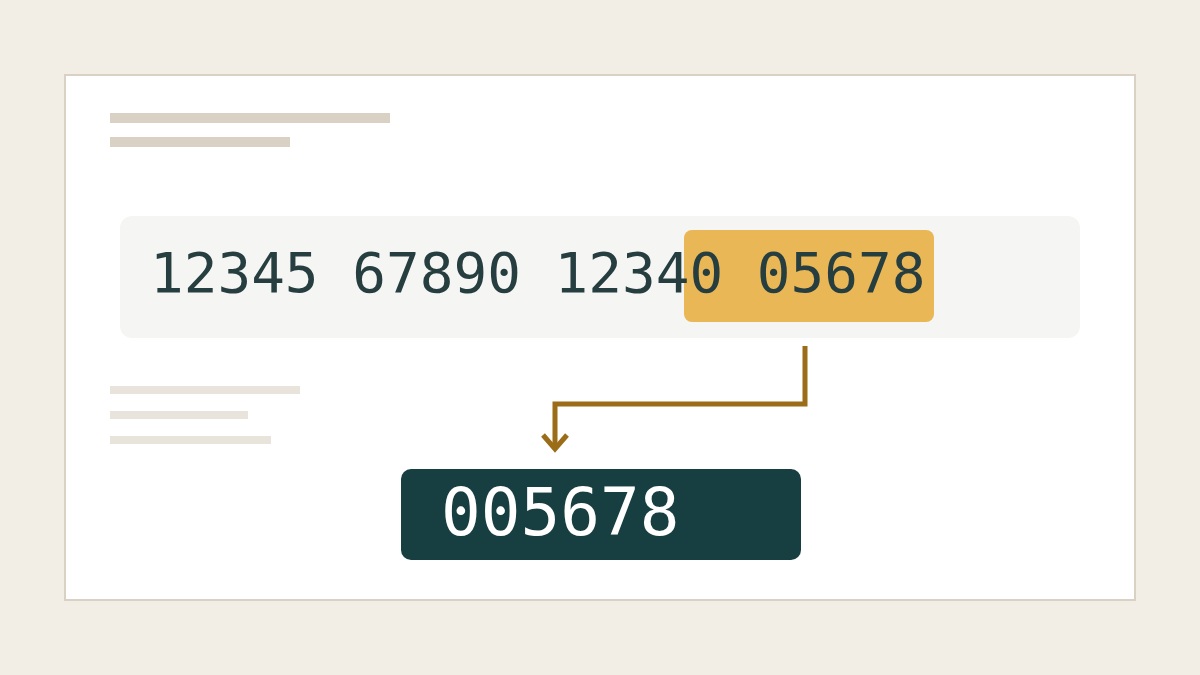
Compare the form with the source once more before submitting. A spreadsheet or another application can turn a digit string into a number and discard the zeros. Store this value as text. Do not change the invoice file to match what another application has produced.
If OCR fills the box, inspect the actual digits it selected. A complete-looking value can still come from the wrong field or omit a character at the edge of a scan. Correct a readable transcription error in the form; when the source is unclear, obtain better material instead of guessing successive combinations.
When there is no code
For common fully digitalized special and ordinary invoices, the national platform’s operating instructions use the 20-digit invoice number, issue date and total including tax, labelled 价税合计. That route does not ask for a verification code. Do not extract a suffix from the invoice number to fill a box belonging to a different route.
Digital invoice formats also look different from older documents. AWS China’s issuer guide illustrates the change to a 20-digit invoice number. Use that as format context, not as a universal rule for every PDF supplied by a Chinese business. Finding no verification-code field does not, by itself, establish that the invoice is false or incomplete.
There is a narrower paper-invoice exception worth checking. For paper ordinary VAT invoices issued through the electronic invoice service platform, the official instructions identify the relevant code input as the last six digits of the invoice number in the password area. They also list a route using the 20-digit invoice number, date and tax-inclusive total. This is a specific issuing-system rule, not permission to use any invoice number’s last six digits.
If the document and the chosen form still do not fit, ask the issuer to confirm the invoice type and issuing system. A useful request is: “Please send the complete original invoice and confirm which fields apply to its verification route. The form requests a verification code, but we cannot locate that field on this copy.” This asks for clarification of an existing document, rather than an invented code or an unnecessary replacement invoice.
From readable fields to a check
Once the field is identified, keep the original file beside the form and submit through the appropriate route. ChinaValidate’s invoice verification tool offers supported file and manual-input options. Check the selected invoice type and the fields actually requested; a successful upload alone does not establish a successful invoice check.
For a blurred or cropped attachment, the invoice PDF guide covers obtaining a usable file. If readable, correctly selected inputs return an inconsistency, follow the verification-mismatch guide. Keep the response distinct from the problem of locating a code: knowing which six digits to enter is preparation, while the returned result is evidence of what the service checked.