
Check a Chinese Company from a Business License
Use a business license photo to identify a Chinese company, understand field comparisons and continue with company and invoice checks.
Start with the Chinese legal name or USCC. Confirm the matching company before opening its profile.
A supplier sends you a Chinese business license as a photo. You can see the company name, but you cannot copy it into a search box, and the English trading name on the quotation is different. You do not need to translate the whole document before looking up the company.
Start with the original license image. ChinaValidate’s business license check reads the document, uses its company identifiers to look up Mainland Chinese business records, and compares the available fields. You can then open the company information for that same registered entity. The useful outcome is a company you can identify and investigate, with any differences still visible.
This is a comparison of document information with retrieved company data. It does not authenticate the photograph, establish who sent it, or certify that the supplier will fulfil an order. Keep that distinction in mind when using a matching result.
1. Prepare the license file
Use the clearest copy you received. A phone photo, scan or readable screenshot can provide the necessary information; the file does not have to contain selectable text. What matters is whether the actual license fields are visible, especially the full Chinese company name and the Unified Social Credit Code.
The current upload tool accepts JPG, PNG and a single-page, unencrypted PDF, up to 10 MB. Upload one license at a time. A catalogue page containing several small license thumbnails is a poor substitute for the original image, even if the overall file looks sharp.
| File received | Preparation | When to request another copy |
|---|---|---|
| Phone photo or scan | Keep the whole license visible and the text upright. | Glare, blur or a fold obscures a name, code or comparison field. |
| Chat screenshot | Use the original attachment if available; preserve the full document. | The screenshot cuts off the code or reduces the text to unreadable pixels. |
| PDF attachment | Provide the single license page without password protection. | The file contains several documents or only a small embedded thumbnail. |
Keep an unchanged copy before rotating a working image or extracting a PDF page. Do not redraw characters, replace numbers, or use generative image enhancement to fill in unreadable text. Those operations can produce a plausible-looking value that was never present in the supplier’s file.
For a simple readability check, enlarge the company name and code on your screen. If you cannot distinguish the individual characters, ask the supplier for the original file rather than repeatedly submitting the same compressed screenshot. The business license field guide helps you locate these fields without translating every line.
2. Upload and confirm identity
Open the business license check and select the file. The normal path is automatic: the tool reads the image, extracts company information and looks for the corresponding business record. Manual correction or selection is needed only when the information is insufficient or the lookup cannot identify one company confidently.
- Read the extracted identifiers. Check the Chinese name and complete code against the original image. A correctly copied identifier is more useful than an attractive English translation.
- Resolve any requested input. If an identifier needs correction, copy what the document actually shows. If it is unreadable, obtain a clearer file instead of guessing.
- Confirm the selected company. Where several candidates appear, use the complete Chinese name and code to distinguish them. Shared English wording or a similar city name is not enough.
- Read the comparison. Once a company is identified, examine the individual rows as well as the overall result.
The Unified Social Credit Code is an 18-character identifier. The National Development and Reform Commission’s explanation describes its role in uniquely identifying an entity and linking records. This makes the code particularly useful when a supplier uses a brand, trading name or informal English translation.
ChinaValidate prioritizes a usable Mainland credit code and can also search by the exact Chinese name. A missing or unreadable code therefore does not automatically make the document unusable, but it can make identification less straightforward. Do not choose a nearby-looking result simply to complete the process.
If the company already has a usable Chinese name or code in an email, you can also use the company lookup workflow directly. Uploading the license is especially helpful when those identifiers are trapped inside an image or when you want to compare more than the name alone.
A license sent through Alibaba or a sales conversation identifies the entity named on that document. It does not by itself establish that the sender controls the company or the storefront. For that separate connection, use the Alibaba supplier registration check alongside the company result.
3. Read the comparison
The result compares seven fields when they are available: company name, Unified Social Credit Code, legal representative, registered capital, registered address, establishment date and business scope. Company status is shown separately; it is not an eighth printed field being compared.
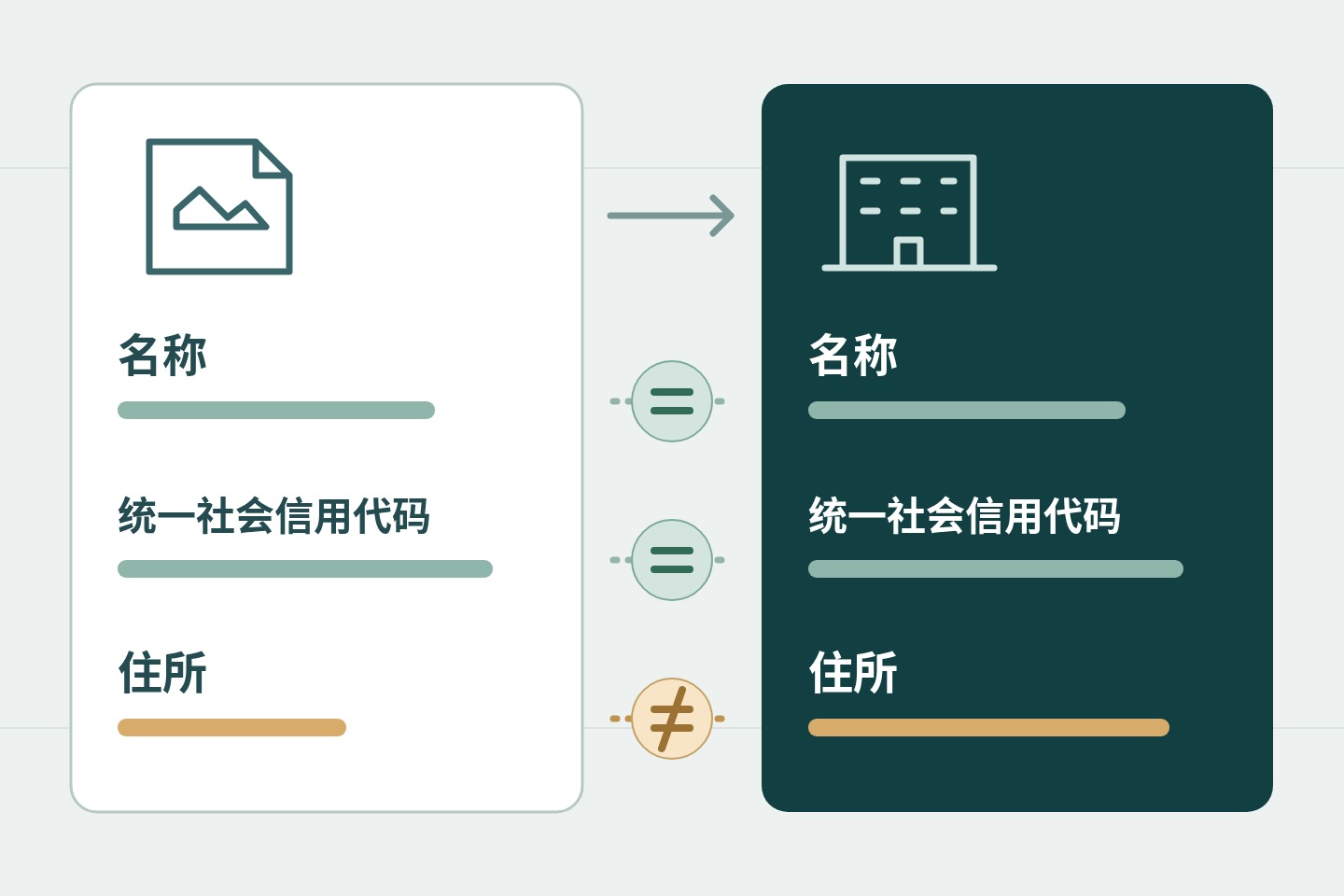
Each row answers a narrower question than the overall result: was the value readable, was a corresponding company value available, and did the comparison find them consistent? A blank value cannot provide the same assurance as a completed comparison.
| Outcome | Meaning | Next action |
|---|---|---|
| All compared fields match | The required comparison fields are available and consistent with the retrieved record. | Continue checking the same company’s information and status. |
| A field differs | At least one document value differs from the company data. | Check recognition first, then investigate the specific difference. |
| Some fields are unavailable | The comparison is incomplete, even if the available rows agree. | Identify what could not be compared and obtain the missing information. |
| No company found or input needed | The lookup has not established a usable company match. | Recheck the name and code or provide a clearer document. |
| Service temporarily unavailable | The check did not produce a usable result. | Follow the displayed recovery option; do not treat this as a company finding. |
An overall mismatch can coexist with unavailable rows. Read the whole comparison so that one visible difference does not hide other unfinished checks. Similarly, “not found” describes this lookup’s result; it is not proof that a company does not exist.
Work through a difference in two stages. First, compare the extracted text with the image. If the tool read a character incorrectly, resolve that recognition error. Second, if the extraction is accurate, compare the document value with the retrieved record and ask for an explanation supported by the relevant company information.
For example, imagine that the name and code agree but the address differs, as in the illustration. A clearer photo will not resolve the issue if it confirms the same address already extracted. The useful follow-up is a current license copy or an explanation of the registered-address change. This is a hypothetical example, not evidence about a particular supplier.
Differences in formatting also need context. Spacing, punctuation, date layout or the units used for registered capital can make two values look different before normalization. Conversely, two similar-looking company names can belong to different entities. Judge the underlying field and its unit, not just the visual shape of the text.
The retrieved data may reflect an earlier update or a recent cached response. Do not describe the result as a fresh, direct confirmation from the government every time you upload. When the timing of a change matters, establish the dates of both sources rather than assuming the photograph or the lookup must be newer.
A photograph of an electronic license is also different from validating the original electronic credential. SAMR’s electronic business license rules describe digitally signed credentials and official verification arrangements. This upload comparison does not perform that official credential-validation procedure. The separate license verification guide covers document-authenticity concerns in more detail.
4. Continue the company check
Once the identity is resolved, use the result’s company-information action to continue with the same entity. Keep its Chinese name and code together in your notes. Starting a new search with only the supplier’s English brand can accidentally move the investigation to a different company.
The license comparison establishes a starting point for company research. It does not answer every question about ownership, operations or public risk records. Choose the next inquiry according to the decision you actually need to make, and distinguish an unavailable record from a positive finding.
| Your question | Information to examine | Reading limit |
|---|---|---|
| Which entity is this? | Chinese name, code and company profile | An English brand alone does not identify the legal entity. |
| What is its registered position? | Company status, establishment date and available registration information | A readable license photo does not establish current status. |
| Who is behind it? | Available shareholder and corporate relationship information | The legal representative named on a license is not a complete ownership list. |
| What needs further investigation? | Relevant public records and available company-report sections | Missing coverage is not proof that no issue exists. |
For instance, if you are comparing two proposed suppliers, record the name and code for each separately before reading their profiles. Similar names, a common contact person or the same website should not cause their records to be merged. If you need ownership details, the shareholder lookup guide explains that next task.
Keep the document reading and business judgment separate in your working notes. “The uploaded address matches the retrieved registered address” is a precise observation. “The factory operates there” is a different claim that may require further evidence. A registration comparison cannot establish production capacity, product conformity or control of a bank account.
5. Link invoices and records
If the supplier also provides a Mainland Chinese tax invoice, it offers another document to examine. Use invoice verification for the invoice itself, then compare its seller’s name and tax identifier with the company identified from the business license. Keep the invoice result and company result as separate findings.
Read the seller section, not the buyer section. When the seller is an enterprise using a Unified Social Credit Code as its tax identifier, that code provides a useful connection to the company record. If another entity issued the invoice, identify it separately and clarify its role rather than silently attaching its invoice to the first company.
This route applies to supported Chinese tax invoices. A commercial invoice or proforma invoice should not be submitted as if it were a Chinese tax invoice. The fapiao and commercial invoice comparison explains the distinction if the document type is unclear.
For a useful handover to a colleague, retain a compact set of connected records:
- The original file. Keep the image or PDF as received, with the date and source of the attachment.
- The identified company. Retain the Chinese name and complete code, together with the company profile you actually examined.
- The comparison result. Download the available PDF and preserve the check date, individual differences and fields that were unavailable.
- Any follow-up explanation. Attach a clearer copy or supporting information to the relevant unresolved field, without replacing the original record.
ChinaValidate can provide translated reading alongside the Chinese original. Use that translation to understand and discuss the result; retain the original identifiers for subsequent searches. It is not a certified translation, and an English company rendering should not replace the Chinese name in the record.
With a readable file ready, upload the business license. Follow the extracted identity through the comparison and into the company information. That gives you a practical route from a supplier’s image to a specific Mainland company, with a clear record of what matched and what still needs an answer.