
Chinese Business License QR Code
Read a Chinese business license QR result, distinguish enterprise codes from login codes, and continue a company check when scanning fails.
Start with the Chinese legal name or USCC. Confirm the matching company before opening its profile.
A Chinese business license QR code can lead you to information about the company named on the document. The useful check is what you find after scanning: the registered name, Unified Social Credit Code and relevant company information. A code that opens successfully does not authenticate every part of a license image.
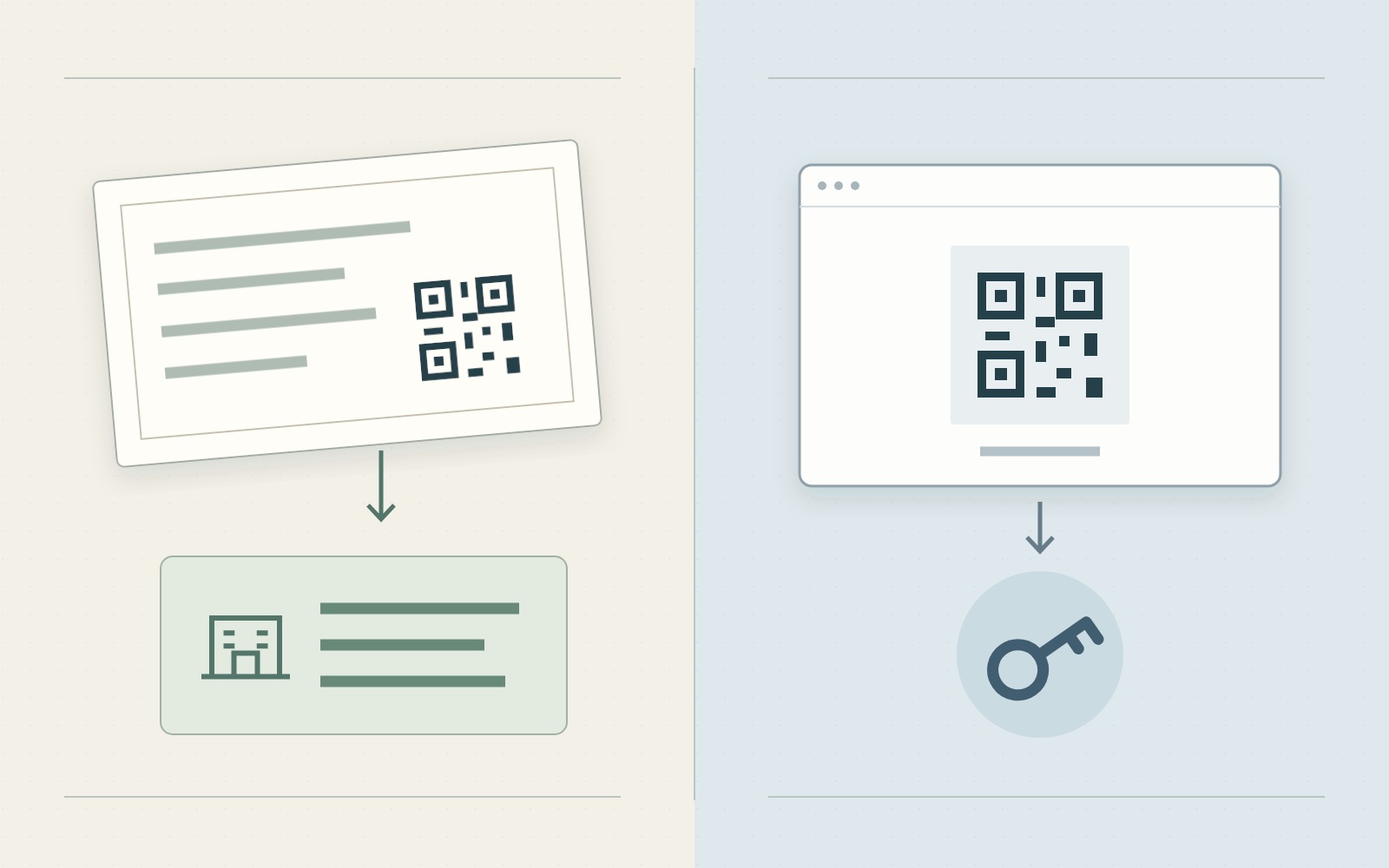
Start by identifying the code you received. A QR code printed on a license, an enterprise code displayed by a supplier and a QR code on a government login screen do not necessarily perform the same task. This guide explains those differences and the next steps for an overseas buyer checking a Mainland Chinese company.
If the code will not scan, keep the license. Its readable Chinese name and code may still be enough for a company registration search. You can also use ChinaValidate’s business license check to extract available fields from the document and compare them with retrieved company information.
1. Identify the code
Look at the whole document or screen before focusing on the square pattern. Where the code appears, the surrounding instructions and the action requested after scanning are more informative than the appearance of the QR graphic.
Printed license codes
SAMR’s 2019 business license notice connects the license QR code with the company’s information in the National Enterprise Credit Information Publicity System, commonly called GSXT. The notice introduced the revised format for newly issued, changed and replacement licenses from March 2019, while allowing existing entities to continue using their earlier licenses.
For a buyer, that makes the printed code a route to registration information. It is not a substitute for checking which company the resulting page identifies. A legitimate company’s code could be placed beside unrelated wording in an edited image, so compare the document and the opened record.
The enterprise code
The official route is evolving. In July 2026, SAMR described its enterprise code program, which connects paper and electronic licenses with business information. Public information lookup and identity verification for government services are different uses within that program.
A September 2026 report on Xiamen’s rollout describes license QR codes opening the electronic business license mini program. It also explains that existing entities can apply for replacement licenses according to their needs. This is a local example, not a nationwide date on which every older license stopped working.
Do not reject a scan solely because it opens a mini program instead of the browser page you expected. Establish that the service is the official one, read the information it provides and check the company identity. Conversely, a familiar-looking screen is not enough to establish who operates it.
| Code location | Likely task | Buyer’s next action |
|---|---|---|
| Printed business license | Open information connected with the registered entity. | Inspect the official destination and compare the company name and USCC. |
| Official enterprise code or electronic license display | Query associated information or verify a presented identity, depending on the service. | Follow the official viewing procedure and read the actual result. |
| Government website login screen | Let an authorized holder sign in using an electronic license. | Return to a public lookup route; this is not a request for a buyer to assume the supplier’s identity. |
Login and signing codes
The Shanghai electronic license guide separates showing a license from scanning a business login or signing code. Its instructions describe an authorized user selecting a license and confirming a login or signature. These are actions performed as the business, rather than ordinary public research about it.
If a screen asks you to select the supplier’s license, enter its credential password or authorize a signature, stop that route. Ask for a public company record or an appropriate official license display. A procurement check does not require the supplier to share control of its electronic license with you.
2. Read the company record
Once a scan opens a usable result, put the license and the result side by side. Keep the original Chinese identifiers visible even if your browser or a colleague translates the rest of the screen. An English trading name can help communication, but it should not replace the registered name during this comparison.
- Confirm the destination. For a browser result, read the actual hostname, not only a logo or page heading. For a mini program, establish its official origin through the regulator’s own service entry. A supplier’s website describing itself as a verification service is a separate source.
- Match the Chinese name. Compare the full name, including the location and company ending. If the result names another entity, record that difference instead of assuming the companies belong to the same group.
- Match the USCC. Compare the complete identifier under 统一社会信用代码. Do not compare only the first or last few characters. Use the USCC guide if you need to identify that field.
- Read the dated information. Note the displayed status, relevant registration details and when you checked them. Distinguish a current result from a screenshot the supplier captured earlier.
A matching code, different text
Consider a hypothetical license image whose QR code opens a record for Company A, while the printed name describes Company B. The scan has given you a useful lead, but the image and record do not identify the same business. Repeating the scan does not resolve that conflict.
Search the printed Chinese name and the printed USCC independently. Save the conflicting result and ask the supplier for a complete current license belonging to the entity on your order. Until the discrepancy is explained, keep the two identities separate in your supplier file.
A different address requires a narrower follow-up. If the name and USCC agree, check whether the image predates a registration change or whether a character was misread. Do not silently replace the document’s address with the online value. For a complete field comparison, follow the business license reading guide.
Public information and credentials
An official company information page and a validated electronic credential are related, but they are not identical outputs. Shanghai’s official service explanation describes the electronic license as a digitally signed document with identity, display and signing functions. A photograph of that document does not itself perform those functions.
Describe what you actually checked: for example, the name and code on an image agree with the public company record you opened. Reserve a statement about electronic credential verification for an actual result from the appropriate official procedure. Neither finding alone establishes that the salesperson controls the company or can fulfil your order.
3. Resolve scan problems
“The QR code does not work” can describe several different failures. Separate a camera-recognition problem from a page-access problem and from a company-identity mismatch. The next action depends on which stage stopped.
The image is unreadable
Ask for the original attachment if you received a thumbnail, cropped chat image or compressed screenshot. Keep the entire license and the area around its code visible. If you are scanning a document displayed on another screen, try a clear view without glare before requesting another file.
Enlarging an image does not recover missing information. Do not redraw the square pattern or use generated details to make it scannable. If the name and USCC are readable, move to a company search while you request a clearer copy. If those fields are also unclear, ask the supplier to send them as text.
The destination will not open
Record the actual message and the destination, if visible. A code that has been recognized but leads to a loading error has passed a different stage from one the camera cannot read. Neither result, by itself, establishes that the company or license is false.
Use the application specified by the official service where appropriate. If that route is unavailable on your device, request a viewable official record and carry out an independent name or USCC lookup. Do not repeatedly upload the same document expecting an unrelated access restriction to disappear.
In particular, an expired login-screen QR code concerns that login attempt. It does not tell you that the supplier’s business license expired. Check the words around the code and return to the public lookup task rather than treating every expiration message as a registration finding.
The wrong company appears
Check that you scanned the code attached to the actual license, rather than a nearby contact, payment or promotional code. Then compare both identifiers. If another company still appears, retain the result and ask for an explanation supported by current company documents.
A supplier might explain that an affiliated company provided the document. That explanation creates another company to identify; it does not make the original mismatch disappear. Independent sourcing guidance also distinguishes registration identity from the transaction relationship. Confirm which entity is selling to you before attaching the license to its supplier record.
4. Continue without the QR code
The QR image is an access route, not the only usable part of a license. Choose the next route from the information you can actually read. Do not let an unsuccessful scan turn into an open-ended delay in identifying the supplier.
Use the available identifiers
- Readable name and code: search the full USCC or exact Chinese name and select the corresponding company. Keep both identifiers with the result so later checks stay attached to the same entity.
- Readable license image: upload it to the business license check. Review the extracted identity and any requested correction before interpreting the field comparison.
- Missing identity information: request a complete current copy and the name and USCC in text. A clearer logo, English brand name or another cropped QR image will not answer the missing-identity question.
ChinaValidate’s upload workflow compares available license fields with retrieved business information. It can help you move from a document image to the identified company, including when the QR image is unusable. It does not act as the government’s electronic license signature verifier or certify the authenticity of the photograph.
For the detailed upload and comparison process, use Check a Chinese Company from a Business License. Read unavailable fields and mismatches individually. A completed upload is not necessarily a complete comparison, and a lookup that returns no company leaves the identification unresolved.
Request a usable replacement
A focused request is easier to answer than “your code is invalid.” Describe the obstacle without turning it into an accusation. For example:
The QR code in the forwarded license image does not open a usable company record on our device. Please send the original, complete license file and confirm the full Chinese company name and USCC in text. If you provide an official electronic license display, please use the viewing route rather than a business login or signing request.
Adapt that wording to the actual issue. If the scan opens a different company, name the two conflicting fields instead. If only the image is blurred, request the original attachment; there is no need to ask for unrelated confidential documents or the supplier’s account credentials.
Finish with a short record of the file received, the company identified, the source and date of the lookup, and any unresolved difference. Then continue with that company’s registration information. The useful outcome is a clear connection between the supplier’s document and a specific Mainland entity, not simply a QR code that a phone can read.