
China Business License OCR API
Extract fields from a Chinese business license image, review the readings on the original, and use the confirmed code for a company lookup.
Start with the Chinese legal name or USCC. Confirm the matching company before opening its profile.

A supplier sends a photograph of its Chinese business license. Your onboarding form needs the Chinese company name and the Unified Social Credit Code (USCC), but someone would have to type both from the image. The ChinaValidate business license OCR API extracts the visible fields so you can prefill the form. A reviewer can confirm an uncertain character against the image and then use the confirmed code to look up the company's current registration record.
Keep those steps visible in the workflow. The submitted image shows what the supplier provided. The recognition response shows what the API read. The company profile adds the current registration information returned for the company you looked up. Preserving all three gives the reviewer something concrete to compare when a name, address or code differs.
The incoming license image
Start with an image that shows the whole license and the characters the form needs. A supplier sometimes sends the reverse of a page, an image of a different document, or a screenshot in which a toolbar covers one of the lines. If the company name or code is partly hidden, request a clearer copy before filling the missing text. Keep the original attachment with the intake record so the next reviewer can see which image was actually submitted.
Mainland China's market entity registration rules list the name, type, address, business scope, registration authority, establishment date and unified social credit code among the items a business license carries. The rules also name the legal representative or other person responsible, depending on the entity type. That list is useful when deciding which values your intake form needs. The OCR response describes the particular image you sent, so a value can be unavailable even if that item belongs on the license. SAMR registration rules, Article 23.
Give the uploaded image its own reference in your system. An onboarding case may also have a quotation and a bank confirmation. Those documents answer different questions and can name different parties. Linking the OCR response to the actual license file is more useful than storing the extracted name without the document it came from.
Ask for a straight-on photograph with the corners and margins visible. Reviewers can then distinguish a line lost at the edge from one that is genuinely blank. For an image received through an upload form, preserve the original orientation and aspect ratio in the file you send. If the supplier replaces the photograph, treat the replacement as a new attachment while keeping it tied to the same intake case.
Two request formats
The recognition endpoint accepts either an image URL in JSON or the image bytes as the request body. Send one input per request. The production documentation lists PNG, JPG, JPEG, BMP, GIF, TIFF and WebP images up to 10 MB. Both examples below assume the API key is available to your server as an environment variable.
| Image in your workflow | Request | Language parameter |
|---|---|---|
| Image at a URL the API can access | JSON containing image_url
|
language in the JSON |
| Image already stored by your backend | Binary body with application/octet-stream
|
language in the query string |
Use the URL route when you already have an image location that can be fetched by the API. The example link stands in for the actual license image. A link that requires your staff member's browser session will not give the API the same access. For an internal upload you can send the bytes directly from your own server.
curl -X POST 'https://api.chinavalidate.com/v1/business-licenses/recognize' \
  -H "Authorization: Bearer $CHINAVALIDATE_API_KEY" \
  -H 'Content-Type: application/json' \
  --data '{"image_url":"https://example.com/business-license.jpg","language":"en"}'
For a binary upload, use the original image file as the request body. In the example, save the image as business-license.jpg or substitute its actual path. The query string requests English display values. Keep the API key on your backend and attach the returned result to the supplier's intake record. Business license recognition API reference.
curl -X POST 'https://api.chinavalidate.com/v1/business-licenses/recognize?language=en' \
  -H "Authorization: Bearer $CHINAVALIDATE_API_KEY" \
  -H 'Content-Type: application/octet-stream' \
  --data-binary '@business-license.jpg'
Choose the request format where your backend receives the document. An integration may already store the attachment as bytes, in which case it can send those bytes to recognition and keep the file reference in its own system. When a URL is already part of the intake record, confirm that it points to the intended image and stays available for the request. Record which route was used so an inaccessible URL and an unclear photograph can be diagnosed separately.
Prefill the supplier form
Read the extracted values under data.fields. Start with the company name and unified social credit code. Depending on what the image and the result contain, you can also use the recognized address, legal representative or other requested fields. Keep the USCC as a string, and leave a missing value open for review. A form is easier to check when it shows which values came from the scan and which a reviewer changed.
If the response includes translation, use it to display readable values to colleagues who work in another language. Preserve the original Chinese name in data.fields.company_name and the original identifier in data.fields.unified_social_credit_code. A translated label helps people in the purchasing system recognize the company. The original name and code give the reviewer a way to reconcile the record with the license and the registration lookup.
When a field is available, show it beside its label on the form. If the system already holds a vendor name, keep that value visible while proposing the new reading. A supplier's storefront name, the name from a license photo and the name stored against a purchase order may be different strings. The reviewer should be able to tell which one would update the registered-name field before committing the change.
Test which fields should auto-fill and which should wait for a person. A readable company name is useful as a suggested value. An obscured USCC should leave the identifier field unresolved. A reviewer who fixes a character should be able to save the confirmed value without losing the original OCR result. Keep the Chinese text available even if the local purchasing team usually works from a translated display.
Locate a field for review
The API can include field-level details in data.field_details, such as the confidence for the name or value and the image coordinates of the recognized value. Match the detail entry by its field_name. Keep the API's coordinates with the image dimensions, and use them to place a highlight over the relevant area when the reviewer opens the original image. The excerpt below uses the illustrative company-name entry from the developer documentation.
{
  "width": 1280,
  "height": 906,
  "field_details": [{
    "field_name": "company_name",
    "value": "苏州示例精密制造有限公司",
    "value_confidence": 98,
    "value_positions": [
      {"x": 258, "y": 302}, {"x": 538, "y": 302},
      {"x": 538, "y": 331}, {"x": 258, "y": 331}
    ]
  }]
}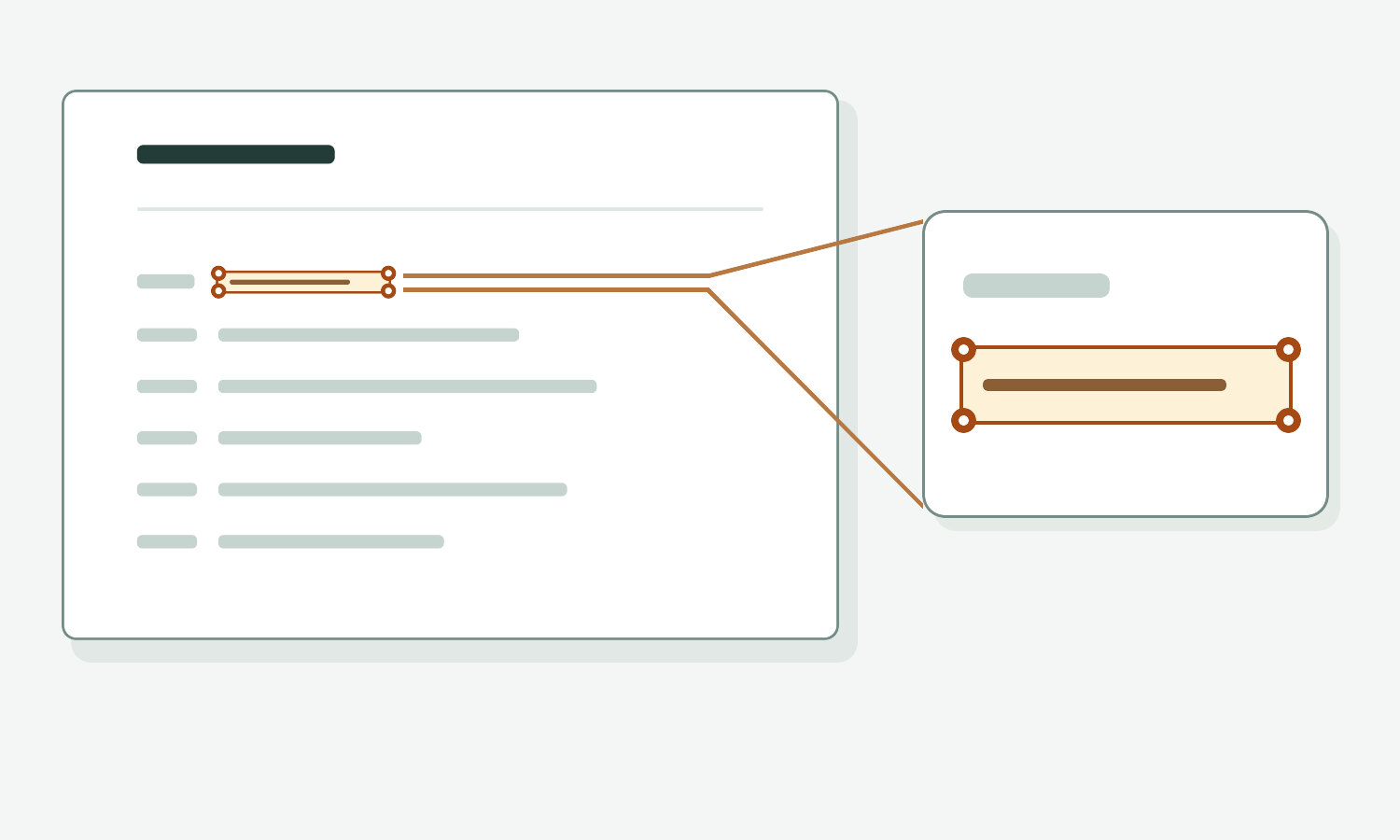
Scale the coordinates to the image being displayed. When the preview fits the image inside a larger box, account for the blank margin around the image before drawing the outline. Use the orientation that corresponds to the returned coordinates and test a rotated photo so you know the highlight lands on the intended line. If the API returns a confidence value without a position for a field, present the value with a link to the original image.
For example, the source image in the sample is 1280 pixels wide and 906 pixels high. If the displayed image is 640 by 453 pixels, the scale is one half in each direction. The first corner moves from (258, 302) to (129, 151) before adding any offset from the display container. Check the full polygon at that size. A highlight that drifts when the window narrows can send the reviewer to the wrong line even when the text was read correctly.
Confidence gives a reviewer a way to prioritize which readings to inspect. A clear line with a high confidence value can still be the name of a different company, and a grainy line can be transcribed correctly after a closer look. If the last characters of the code are obscured, save the readable parts as recognition output and ask for the complete code or a better image. That keeps the suggested transcription from becoming a permanent vendor identifier.
Give a reviewer space to see the whole image and a closer view of the highlighted area. If the image is blurred, the surrounding label can establish which value is being reviewed, but it may still take a replacement photo to read the characters. In that case, record the field as pending and keep the review on the same supplier case.
Check the current company record
After the name and code have been confirmed against the image, use the code to retrieve the current basic profile. The company profile API takes the full Chinese legal name or the 18-character USCC in company_name_or_credit_code. If the code is usable, pass it through as a string. Use the returned code and registered name to confirm which company you found, then check the other fields your purchasing workflow requires. Company profile API reference.
If the registry returns a different address for the same code, keep both addresses and record which document supplied each one. The old photo and the current profile may describe different points in time. The reviewer can ask for an updated license and decide which address belongs in the purchasing system. If the codes differ, review which legal party the invoice or contract actually names before associating the new record with an existing vendor.
Record the lookup time separately from the OCR time. A colleague reopening the file should be able to see the image received, the text read from it, any correction, and the registration information returned for the confirmed company. This makes it possible to revisit a discrepancy without overwriting the earlier evidence.
Use the same lookup path when a reviewer notices a difference between a company name in the purchasing system and the text on the license. Keep the name read from the document, the confirmed legal name and the current registered name next to their sources. The reviewer can then tell whether the issue began with the photograph, the original transcription or an update to the company record.
A reviewable intake record
For the first implementation, connect the license image to a form with the Chinese legal name, USCC, and a review action. Add the field highlight when the result includes coordinates. Test the path with a readable image, an obscured field and a license that needs an updated copy. Check that the reviewer can correct a value, retain the original read, and run the profile lookup with the confirmed identifier.
Open the ChinaValidate Developer Center for the full request and response fields. For the steps a reviewer can follow without an API integration, see the guide to checking a company from its business license.