
Chinese Invoice Code Lookup
Read the full code on an older mainland Chinese VAT invoice, interpret it by invoice type and pair it with the right fields for verification.
Start with the Chinese legal name or USCC. Confirm the matching company before opening its profile.
Copy the entire value labeled 发票代码 when a mainland Chinese invoice has a separate invoice code. Keep any leading zero, and copy the value labeled 发票号码 into a different field. To interpret the code, use the invoice title and the rule for that document type. To look up the actual invoice, use the full code with the number, issue date, and other details required for that type.
A code can describe a region, year, batch and invoice format under specific rules. It can recur on more than one invoice. If a colleague sends only the code and asks which company issued the document, request the whole invoice. The seller block and the result for that individual invoice give you the information needed to check the issuer.
The code and number on the original
Start with the issued file or a clear copy of the full page. Read the invoice title before entering anything. On the older electronic special VAT invoice below, the invoice code and invoice number appear together near the title. The check code is printed elsewhere, and the buyer and seller each have their own details. The separated fields are easy to see on the full document, but not always on a cropped screenshot or a text export.
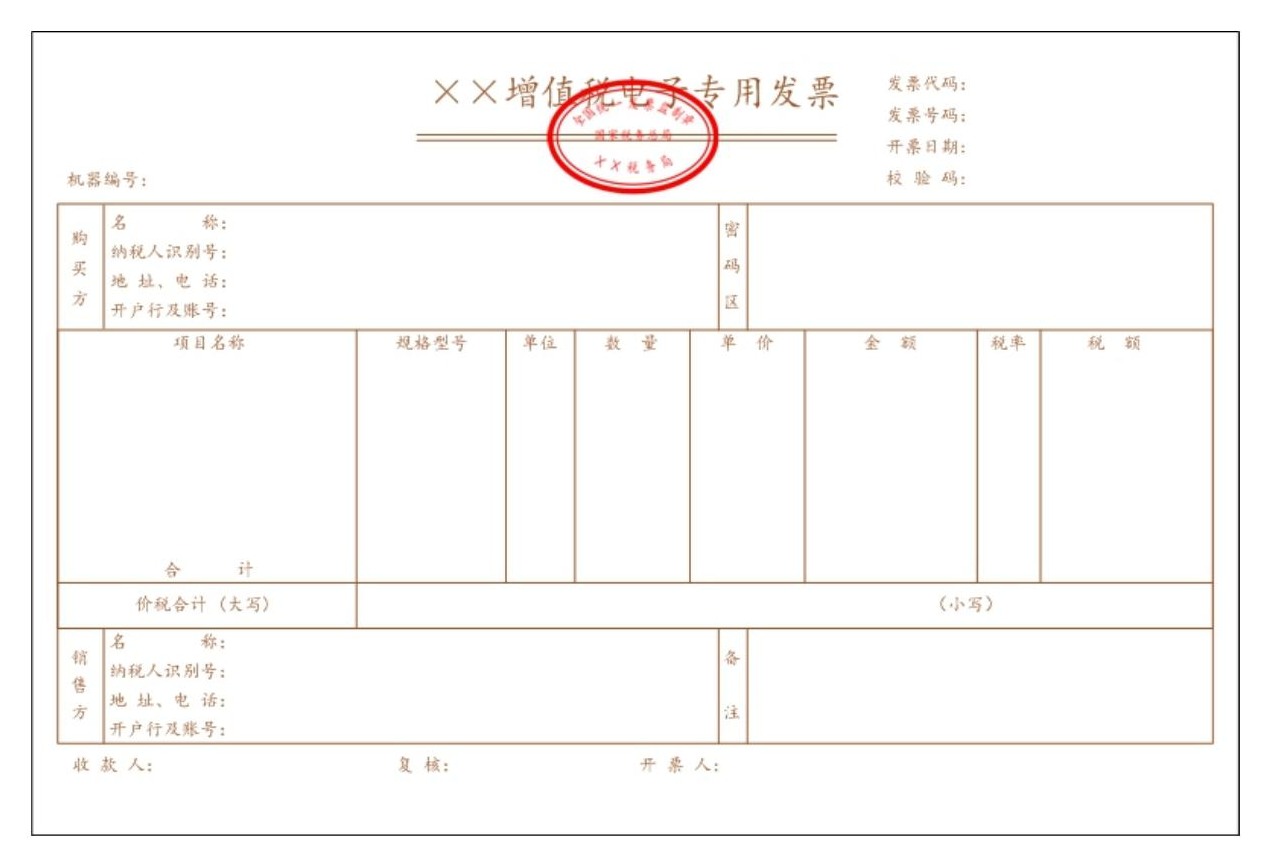
When someone sends a line of digits in an email, ask them to point to the corresponding label on the invoice. Copy each field into its own text cell, then compare the first and last characters with the original. Some spreadsheet imports drop the zero at the beginning or convert a long identifier to a rounded number. Read the original again if the export changed anything. Adding a guessed zero or splitting an unlabeled string can produce a plausible-looking value that belongs to a different field.
A supplier might send the original file and an English summary prepared for an overseas buyer. If the summary uses “invoice no.” for multiple fields, keep it with the purchase documents and take the code from the Chinese label on the issued invoice. Record a commercial invoice reference or an order number in the field your team uses for those documents. You may need both the trade document and the fapiao to explain the same payment.
The 12-digit code families
Three published rules use the same general layout for 12-digit codes. Position 1 is 0. Positions 2–5 identify the province, autonomous region, municipality directly under the central government or city with separate state planning. Positions 6–7 represent the year, and positions 8–10 the batch. The last two positions depend on the rule for the invoice in front of you.
| Invoice family | Code ending | Meaning in that family |
|---|---|---|
| Older electronic special VAT invoice (增值税电子专用发票) | 13 |
Electronic special VAT invoice format covered by the 2020 announcement. |
| Folded ordinary VAT invoice (增值税普通发票(折叠票)) |
04 or 05
|
04 for the two-copy form and 05 for the five-copy form under the 12-digit rule. |
| Roll-format ordinary VAT invoice (增值税普通发票(卷票)) |
06 or 07
|
06 for 57 × 177.8 mm and 07 for 76 × 177.8 mm. Both are single-copy forms. |
Older electronic special invoices. Paragraph 3 of the State Taxation Administration’s Announcement No. 22 of 2020 sets the 12-digit code ending in 13 and a separate 8-digit number assigned by year and batch. If an electronic file has this title and layout, check those two fields separately. A PDF extension alone tells you nothing about the numbering scheme. 2020 electronic special VAT invoice rules
Folded ordinary invoices. Announcement No. 44 of 2017, effective January 1, 2018, sets the 12-digit rule for these forms. It also allowed tax-authority stock and taxpayers’ unused stock with 10-digit codes to continue in use. A folded invoice in a historical file can therefore have a 10-digit code. Keep the observed length and use evidence appropriate to the document instead of forcing it into the new layout. Folded ordinary VAT invoice code rules
Roll-format ordinary invoices. Announcement No. 82 of 2016 introduced this format from January 1, 2017. It assigns an 8-digit invoice number separately from the code. On a narrow paper document, the line for a machine-printed number or machine number can also look like an identifier for lookup. Read the labels and copy the invoice code and invoice number from the corresponding lines. Roll-format ordinary VAT invoice code rules
Use the suffix as a consistency check after identifying the form. For example, suppose the supplier’s scan is described as a folded ordinary VAT invoice, but the value entered in your log ends in 06. Open the full scan, make sure you copied the code instead of another numeric field, and read the title. If the supplier sent the wrong attachment or the copy is unreadable, ask for the complete issued document. A matching suffix by itself does not say that the invoice is genuine.
Apply a regional code at the level the rule describes. If a supplier has a head office, an operating site and a separate seller in the same group, the region digits cannot tell you which of those companies issued the invoice. Confirm the registered seller name from the seller block, then compare it with the agreement. If the title belongs to another invoice family, look up that family’s instructions before assigning a meaning to the suffix.
The fields that verify an invoice
- Invoice code and invoice number
- Keep both when the invoice has both. Consider an expense file with two roll-format invoices from one batch. Their codes can be identical, while their separately assigned invoice numbers differ. If your accounting import deduplicates on the code alone, compare the numbers and original documents before excluding either record.
- Issue date
- Use the date labeled 开票日期 on the invoice for lookup. The year segment in a code is only part of the code’s classification. For example, a supplier may ask you to compare an invoice with a payment made near year-end. Record the actual issue date and payment date separately so the code’s year does not become a substitute for either.
- Amount or check code
- Follow the official instructions for the invoice type. For the older electronic special VAT invoice above, the national platform asks for the code, number, issue date and amount excluding tax. For ordinary VAT invoices in the folded and roll families covered here, follow the applicable ordinary-invoice instructions for the last six characters of the check code where prompted. Read the platform’s separate instructions if the paper ordinary invoice was issued through the electronic invoice service platform. If several codes appear on the page or web form, use the guide to the invoice check code to identify 校验码.
- Seller’s taxpayer ID
- Read the seller’s name and 纳税人识别号 from the seller block. Use those details to check which business the invoice names and match it to the transaction papers. The code’s region and batch cannot identify that business. Where the seller is a company with a Unified Social Credit Code, that identifier can be used in a China company search.
The national VAT invoice verification instructions list the requested fields by type. Enter the fields using the original invoice. Compare the result with the original, including the seller, amount and issue date, and record the check date. If the returned invoice does not match your copy, recheck your entry and the type selected. Keep the returned result and ask the issuer to clarify any discrepancy that remains.
If a file contains an old code and a result screenshot, confirm the screenshot is for the same invoice number before taking the earlier check as evidence. Matching codes are possible across invoices in the same batch. Compare the date and amount as well, especially when several invoices relate to one shipment or expense report. Where the available record contains a shorter code, keep it as received and ask for the invoice before deciding whether it is a historical format or a transcription error.
Invoices with a single 20-digit number
A fully digital invoice, 数电发票, uses a nationwide 20-digit invoice number under the State Taxation Administration’s Announcement No. 11 of 2024. Use the complete number in the number field. Do not split it into a code and a number because the older layout had two fields. If a purchasing template requires a code even for this format, check the template’s invoice-type setting or ask accounts payable how to record the single number. See the China invoice number lookup guide for that format’s numbering and lookup fields. 2024 nationwide fully digital invoice rules
A code with its source document
Suppose you are reviewing a supplier statement with a column headed “fapiao number.” An export shows a value of 11 digits for one row and the same value in a second row. The original documents show an older electronic special VAT invoice in each row. Both have a 12-digit code beginning with zero and different invoice numbers. Restore each full code from its own document and enter the two invoice numbers separately. Check the date and required amount on each invoice before looking it up. If a third row contains a single 20-digit number, open that invoice, confirm its format and use the number as printed.
Leave the issued document alongside each record and note which fields were used to verify it. Keep the invoice result with the purchase order, contract or expense entry it supports. If the supplier gives you a replacement, retain the previous document, record the relationship between the two and use the issuer’s explanation and invoice records to decide which document is current. The next reviewer should be able to reopen the actual invoice without reconstructing its code from a suffix or a shortened export.