
China Business License QR Code Update
China is putting a unified Enterprise Code on newly issued and replaced business licenses. Use local rollout dates, license status and company records to check an older copy.
Start with the Chinese legal name or USCC. Confirm the matching company before opening its profile.
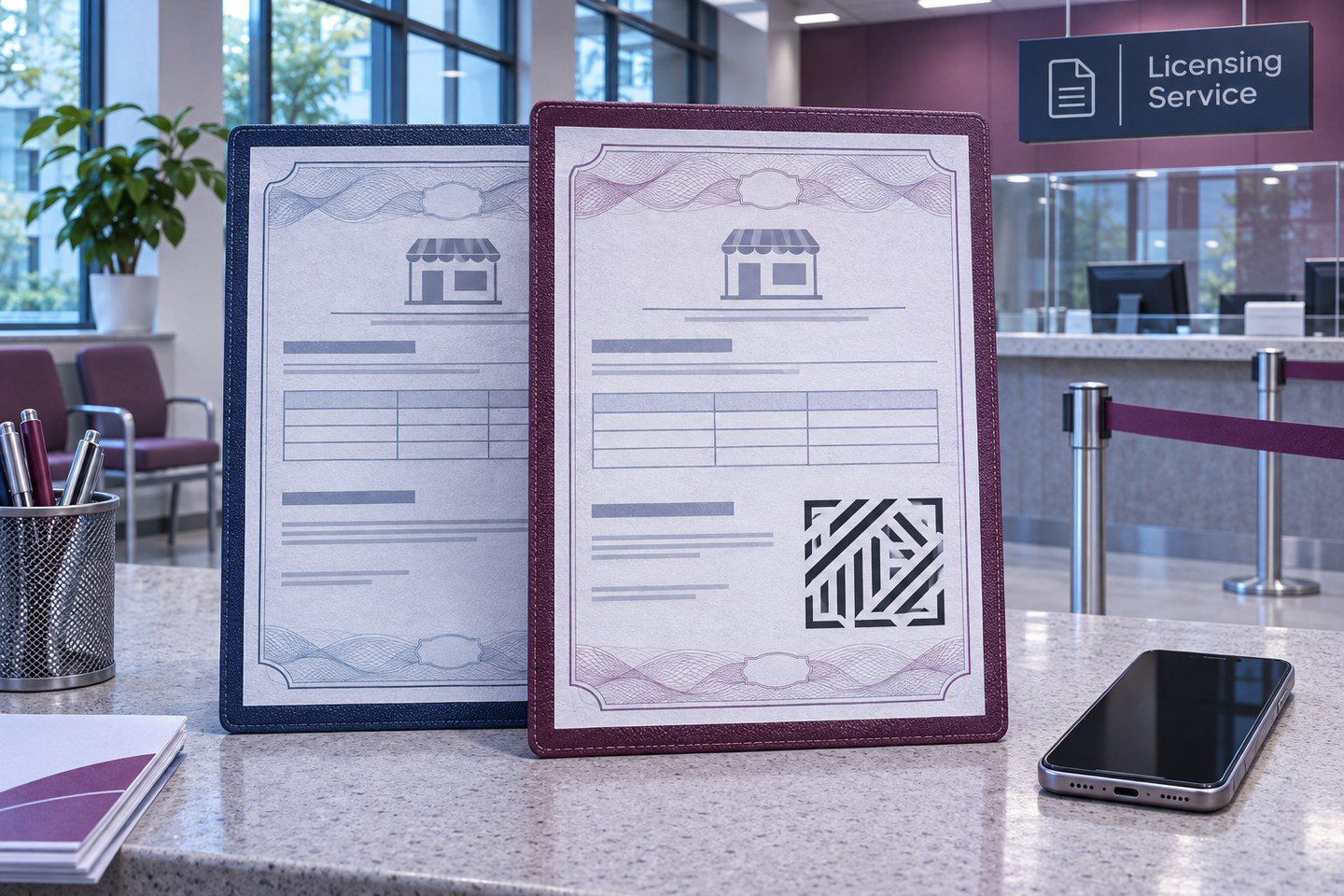
China is replacing the QR code on paper business licenses with the Enterprise Code (企业码) used by its electronic business license system. The national replacement program began on October 31, 2026. Newly registered businesses and businesses approved for a registration change or a replacement paper license receive the new code as the rollout takes effect locally. A paper license issued earlier can still be valid during the transition. The rollout date alone does not invalidate it.
If a supplier sends an older scan, check when the issuing authority began the new issuance, whether that particular paper license has been invalidated, and whether the company’s registration is current. Each check answers a different question. An older layout calls for checking the document history, especially if the company has since moved or changed its name. A readable Enterprise Code can lead to current company data even when the paper carrying it has been invalidated.
The unified Enterprise Code
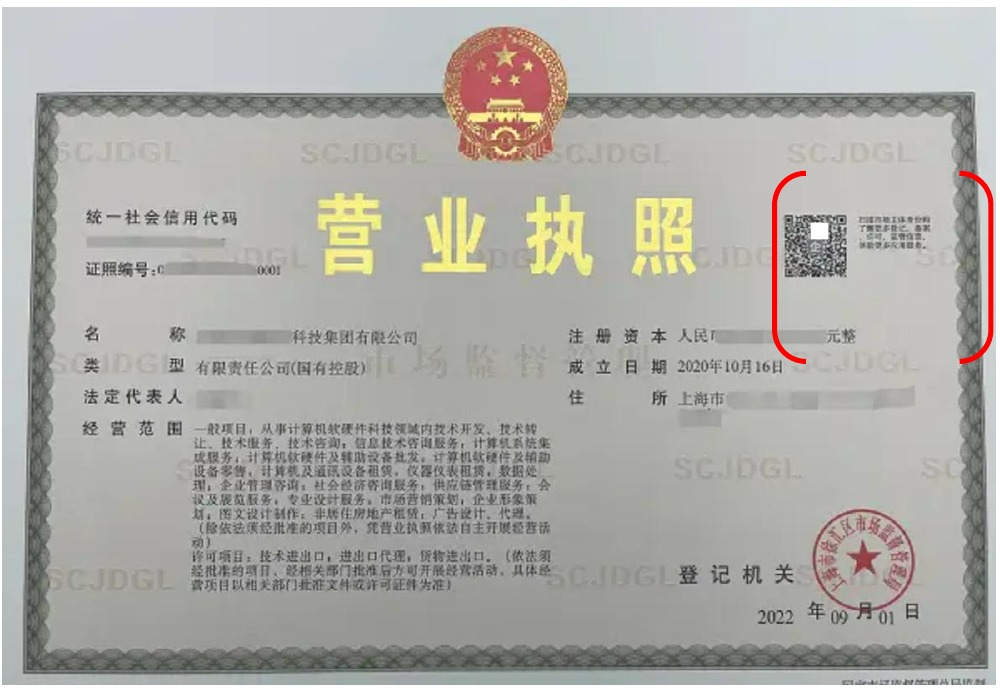
The registration bureau of the State Administration for Market Regulation (SAMR) issued Notice No. 273 in 2026 to standardize the QR code across paper and electronic business licenses. The national electronic business license system generates the code for registration authorities to print. On the paper license it occupies the previous QR code’s position. The note alongside it describes access to registration, filing, licensing and regulatory information. SAMR Notice No. 273 on the unified QR code
The shift is in how the QR code connects to the license system. The Chinese legal name and Unified Social Credit Code (USCC) remain the fields to copy when recording the company’s identity. The Enterprise Code is the scannable symbol, while the printed USCC is the registration identifier you can enter in a registry search. A paper license may also have a document number that identifies its particular issue. Keep that number separate from the USCC when checking a replacement.
Local dates and replacement
Use the place of registration printed on the document to find the applicable notice. The national notice sets a program start and lets provincial registration authorities decide how to handle existing businesses. They can offer a replacement channel directly or issue the updated paper license when a business comes in for a registration change, reissue or another relevant procedure. The dates below illustrate why the national start is a poor way to date an individual copy.
| Date | Authority | What began |
|---|---|---|
| October 26, 2026 | Shaanxi | Province-wide issuance with the Enterprise Code. Existing businesses receive the new format when they handle specified registration procedures, including changes and reissues. Shaanxi implementation notice |
| October 31, 2026 | National | Launch of the nationwide replacement program for paper business licenses carrying the Enterprise Code. |
| November 2, 2026 | Shenzhen | Citywide issuance of the unified code for relevant registration and license services. The city announcement says existing paper licenses continue to be valid and businesses can apply to replace them when needed. Shenzhen rollout announcement |
For instance, two Shenzhen suppliers can send different-looking documents in November. A supplier that recently received a replacement may have the unified code. Another that has had no reason to replace its still-current paper license may send the earlier format. Even in the same city, the date you received the copy can be weeks or years after its issue date. Ask whether there has been a change or replacement since that document was issued, and use the local notice to put the answer in context.
To place a copy on that timeline, distinguish the establishment date from any date of issue shown on the document or in an official record. An enterprise founded years ago may have obtained its first Enterprise Code paper license yesterday. If you have a scan with a cropped date, ask for the full page and the date of the relevant change or replacement. Keep the date you received the scan in your vendor file as a separate field.
Company details and paper status
A result that displays the right name and USCC helps identify the company associated with the code. Check separately whether the paper original or duplicate you were shown is still current. The two results can differ because the business can remain registered after the authority replaces its paper license. When you have a document number in an official result, compare the number for the same copy type: the original (正本) or the duplicate (副本).
The Shanghai change-registration guide gives a concrete example. It describes a paper-license status check under 其他信息 (“Other information”) for licenses reissued with an Enterprise Code after June 21, 2025. The system can show a warning when the paper license has been invalidated, and still let the viewer continue to the company’s information. For Enterprise Code paper licenses reissued before that date, the guide directs the viewer to the numbers for the paper original and duplicate currently held. These screens illustrate Shanghai’s implementation. Use the issuing region’s guidance for the functions available there.
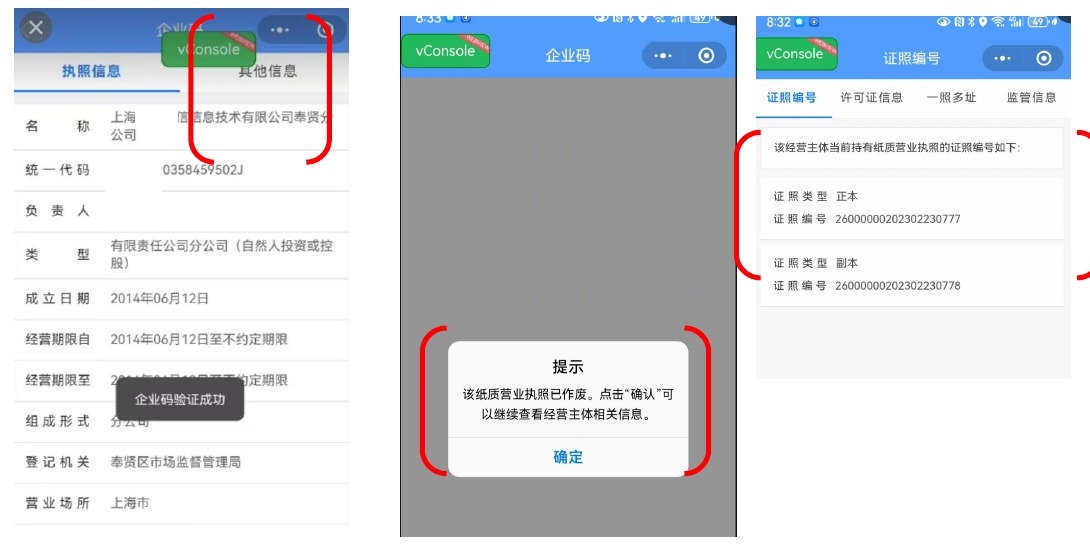
If a paper license has no Enterprise Code, the Shanghai guide points readers to the public license invalidation announcements. On the National Enterprise Credit Information Publicity System, look under public notices for the issuing authority’s 营业执照作废公告(声明) (“Business license invalidation announcements”). Read the entity name, date and document details actually given. An announcement about a prior original or duplicate may concern a different issue of the same company’s license. If you find no relevant notice, keep the result as a dated search and ask for current evidence if the issue still matters to approval.
For a standalone Enterprise Code, start with what was sent. Shenzhen’s announcement encourages businesses to display a code printed from the electronic license mini-program or shown on a screen at their premises. A photo from a showroom can therefore show a code without showing a paper license at all. Save the identity returned by the code if you can verify it through the official service. To check a specific paper issue, obtain the document or issue details from the supplier. To verify an electronic credential, ask the supplier to present it in the official system. These requests are useful when a group displays one company’s code at a site used by another business.
A supplier’s old address on file
Suppose your procurement file contains a scan of a Shanghai supplier’s paper license, and you receive the same scan again for a renewal. The company is still registered under the same name and USCC, but its current registry record shows a different address. Ask the supplier’s administration team when the address changed and which license it uses now. If the code on the scan displays a paper-license invalidation warning, save the warning with that copy and request the current license. The current registry record tells you about the company at the time of your check. The invalidation warning concerns the copy you were given.
A second possibility is that the old scan predates Enterprise Code issuance. The QR symbol might take you to a page without a paper-license status result, or the scan might be too blurry to read. Start from the name and USCC on the complete document and look for a dated address change and a relevant invalidation notice. If the supplier provides a newly issued license, use it for the renewal and keep the earlier scan as evidence of what was supplied for the original order. If the new license has a different USCC, establish which registered entity will actually take the renewal before updating the vendor record.
The new registered address can be relevant to the vendor file without changing where products are made or returned. If the renewal depends on a location, confirm the delivery, service or factory address against the order or agreement. For a regulated product, use any permit information accessible from the code to locate the actual permit and check its holder, scope and validity for the transaction.
Evidence for current approval
Ask for the full current paper license or a verifiable electronic business license when you need current proof. The electronic license has the same legal effect as the paper license under SAMR’s electronic license rules. The rules also provide for downloading the electronic license again after changes to particulars shown on it. A screenshot or a crop of the QR symbol can help you locate a record. For the credential itself, seek a full current document and use the applicable official verification method. SAMR electronic business license measures
Record the legal name, USCC, date of verification and the document you used. Add separate entries for the current registration status and the paper-license result, including the issue or document number when available. “Company found, paper issue awaiting confirmation” gives the reviewer a specific next step. If an official result confirms invalidation of the paper, identify that issue as historical and put the current credential beside it rather than losing the original evidence.
You can use the business license check to compare the details extracted from a copy with company records. Use the official channel for an electronic credential or a specific paper license’s status. If you already have the Chinese legal name or USCC, search the company by name or code. For help getting a usable result from a QR symbol, see the Chinese business license QR code guide.