
Canton Fair Exhibitor Search
Find mainland Chinese exhibitors by product, company or booth. Check the Canton Fair session and phase before building a route and arranging meetings.
Start with the Chinese legal name or USCC. Confirm the matching company before opening its profile.

Before choosing which days to spend in Guangzhou, check the Canton Fair session and the phase for each product you want to see. Use the official exhibitor directory to find suppliers, record the full booth reference and group the results by phase. A product that looks right online is useful for shortlisting. To put it on your route, confirm where and when its exhibitor plans to show it.
Keep a short list of companies to meet, a few alternatives in the same halls, and the details you want to confirm at each booth. This guide focuses on finding and meeting exhibitors that could supply from mainland China. A fair listing documents an event presence or a proposed placement, depending on the source. A separate company record and the exhibitor’s response help establish who will handle your specific inquiry.
The session and phase set your dates
Write down the session number before copying a booth or exhibitor. A screenshot forwarded by a colleague may be from the previous spring or autumn. Check the target edition’s published dates and product sections on the official Canton Fair site. Match the item you want to see to a section for that edition and put the actual date range next to it. If your categories fall in different phases, work out which visit matters most before choosing dates based on a single supplier invitation.
The 140th session illustrates why the distinction matters. In 2026 its first phase ran October 15–19, the second October 23–27 and the third October 31–November 4. A booking made for the overall interval could therefore include days between phases. Use the dates for the session you are actually attending. Distinguish the physical exhibition phase from an online product listing that may still be useful when you are not at the fair. Ministry of Commerce schedule for the 140th session
If your purchase could fit two sections, keep both on the shortlist until you identify the right displays. A kitchen storage item may be listed by material, by use or as part of a line of housewares. Search the product itself and review the sections where the results appear. When your dates are fixed, leave suppliers in a different phase on a remote follow-up list and build the physical route around the phase you can visit.
Product, exhibitor and booth searches
The official search guide shows three search options, for products, exhibitors and booths. It also describes applying an offline exhibition phase filter on the result list. The interface can change between editions. Use the guide to recognize the types of search, and check the session and phase shown on the page you are using.
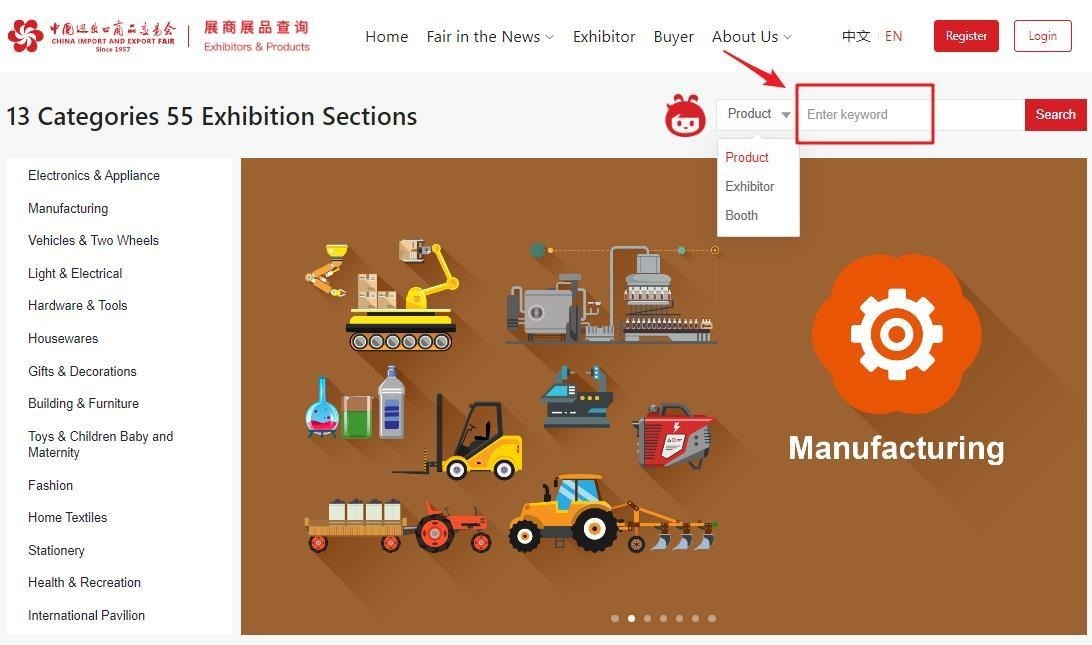
- Product
- Begin here when you have a specification but no supplier. Try the main product name, then a synonym or a material if the initial set is too broad. Compare results with your must-have features. Open the exhibitor entry and check the physical phase and booth before adding it to a visit. Save the listing or model you want the exhibitor to show you.
- Exhibitor
- Use this to find a company you already know by name. Try the full Chinese company name when available. If you have an English trade name, search it as a lead and compare the name as displayed, the product section and the booth for the target phase. Similar English names or a common brand can appear for different companies. Keep candidate listings separate until you have the right one.
- Booth
- Use this when an invitation gives you a booth reference. Copy the full reference, including the hall and any letters or numbers. Check the session and phase as well as the exhibitor attached to the result. If a search returns no match, confirm the reference against the current listing or look up the company name. A missing result is a reason to check again, particularly if the invitation is early.
One search can give you the input for the next. For example, a product search may return several listings for the same exhibitor. Open the company entry and record each distinct booth or phase before removing duplicates. If you start with a booth number from a brochure, use the exhibitor name in the current result to look for the company’s products. Carry the original booth reference and any revised reference in separate fields until the exhibitor confirms which one to use.
Published assignments and later confirmations
Check the date and purpose of the record behind each result. For example, the organizers’ September 1, 2026 notice for the 140th session published a first batch of proposed locations for specified booth types and invited feedback during a stated publication period. The notice covered certain exhibition sections, not every booth. An entry in that batch is evidence of the proposed assignment at publication. It should not be used as a final itinerary if the later directory or the exhibitor has an update. 140th Canton Fair first-batch booth placement notice
Copy the search result and its access date into the list you will take to the fair. Keep the exhibitor’s invitation or reply beside it. If the directory and invitation differ, ask for the updated session, phase, hall and booth in one message. If only a preliminary placement notice is available, mark the location as provisional. If the exhibitor confirms a meeting at a different place, write down the meeting location as such. It may be a meeting room or shared stand rather than the exhibitor’s own assigned booth.
Before relying on an apparent match, check why you found it. A product entry can show the exhibitor that published it. The seller receiving inquiries after the show can use a different name. Ask for the exhibitor’s full Chinese registered name and Unified Social Credit Code (USCC) when the English listing is ambiguous. Use the China company search to confirm a company once you have its name or code. Keep the registry result with the directory entry and its date. A booth listing cannot verify the factory, the specifications or the ability to deliver.
A route built around confirmed meetings
Start with one phase and pin its floor map alongside your list. Group stops by hall and floor, then set the meetings that cannot easily move. Compare the confirmation time with the travel between stops. Put nearby alternatives into the free periods rather than filling the day with back-to-back appointments. The official Canton Fair app guide describes exhibitor and product search, itinerary planning, navigation routes and messaging. You can also save the references in a simple sheet for use during the visit.
Consider a hypothetical buyer comparing two kitchen storage products in the same phase. The first stop is a fixed morning appointment to check a stacking feature. The second company has a promising listing in a nearby hall but has not said whether it will bring the model. The buyer leaves this as a walk-up stop and adds an alternative near the fixed appointment. A third company uses the same English brand but appears in another phase. The buyer sets up a remote introduction and leaves that company off the walking route.
On the map, mark the entry you plan to use and the floor of each meeting. If the stops sit in different areas or on different levels, leave time to find the next hall. Compare the map’s edition and phase with the directory entry before relying on its section labels. A map helps you move between locations, while the dated exhibitor result tells you which booth to look for.
When requesting a meeting, name the session and phase, propose a local time and ask for the hall, booth or meeting point. Identify the product and one or two features you want to discuss. Ask whether the display or an informed staff member will be there at that time. An agreed meeting and a published booth are separate pieces of evidence. Add the meeting to the itinerary when there is a reply, and recheck the official directory and recent messages before travelling and again before heading to the hall.
The sheet to take to the fair
Keep a short record for each stop that you can open while walking between halls. Use one row per company and meeting, with the product model or reference attached. If you are visiting as a team, show who owns the appointment and which questions they need to answer. Save the hall and booth details somewhere you can still read if your connection is poor.
- Fair record. Session, phase, dates, product section, hall and booth. Keep the official listing link or dated copy and distinguish preliminary placements from later information.
- Exhibitor identity. Name as shown by the fair, Chinese registered name and USCC if confirmed, and the dated company record. Leave the company code unconfirmed if you have only a brand or an English alias.
- Visit plan. Meeting status, time, place, the company’s business contact and a nearby alternative. Keep the route by phase and the reply that confirmed the appointment.
- Questions to take. Product or model to see, features to compare, entity expected to handle the inquiry and the information you still need. Add a note on the spot if the exhibitor or location is different from your plan.
Use the visit to confirm which exhibits and companies belong on your sourcing list. If a booth is relocated, keep both the saved reference and what you confirmed on site. End the day with a short note on the product you saw, the company you spoke with and what they agreed to send. If you decide to ask for a quote or sample after the fair, the post-fair supplier verification guide covers connecting that conversation to the seller and subsequent order documents.